Troubleshooting Guide: How to Diagnose Faulty Parts in Your Bissell Vacuum
Experiencing issues with your Bissell vacuum can be frustrating, especially when you're unsure what's causing the problem. From loss of suction to unusual noises or a non-spinning brush roll, many common vacuum problems are linked to simple, fixable part failures. Knowing how to properly diagnose these issues can save both time and money, helping you avoid unnecessary repairs or replacements. This troubleshooting guide is designed to walk you through the most frequent faults found in Bissell vacuum parts, with clear steps to identify and address each one. Whether you’re dealing with clogs, electrical issues, or worn-out components, a careful inspection and a little know-how can get your vacuum running like new again. Let’s dive into the diagnostics.
Common Signs Your Bissell Vacuum Needs Troubleshooting
Even the most reliable Bissell vacuum parts can develop issues over time. If your Bissell vacuum is not working, identifying early warning indicators can help you address minor issues before they become expensive repairs.
Here are some common signs your Bissell vacuum may need troubleshooting:
-
Loss of Suction: Your vacuum no longer picks up dirt effectively.
-
Strange Noises: You hear grinding, rattling, or high-pitched sounds during use.
-
Brush Roll Not Spinning: The brush roll stays still while the vacuum is running.
-
Burning Smell or Overheating: The vacuum emits a burning odor or feels unusually hot.
-
Vacuum Won’t Turn On: Pressing the power button results in no response.
-
Dirty or Poor Airflow: Airflow feels weak, or dust is blowing out from the vacuum.
These signs indicate your Bissell vacuum may need attention or repair.
How to Safely Prepare Your Bissell Vacuum for Diagnosis
Before you start Bissell vacuum troubleshooting, it’s important to prepare it safely to avoid injury or further damage. A seamless and successful troubleshooting process is ensured by taking the appropriate safeguards.
Step 1: Disconnect the Vacuum
To avoid receiving an electric shock, always unplug your vacuum from the power source before doing any repairs or inspections.
Step 2: Make Your Work Area Clear
Keep track of any parts or tools and make sure you have enough space to work comfortably.
Step 3: Empty the Dustbin
Remove and fully empty the dirt container to get a clear view of internal components and avoid messes.
Step 4: Clean or Remove Filters
Follow your model’s instructions to take out and clean filters, as clogged filters can affect performance and diagnostics.
Step 5: Check Hoses and Attachments
Inspect for blockages or debris and clear them before proceeding.
Step 6: Remove Brush Roll Cover
If applicable, carefully take off the cover to access the brush roll and belt. Keep track of screws or small parts.
Step 7: Gather Tools
Have basic tools like a screwdriver, flashlight, and soft brush ready for cleaning and inspection.
You may securely prepare your Bissell vacuum parts and create the conditions for a precise diagnosis by following these instructions.
Troubleshooting Common Brush Roll Issues and Solutions
A malfunctioning brush roll can significantly reduce your Bissell vacuum’s cleaning power. This guide explains how to identify common problems and troubleshoot them effectively.
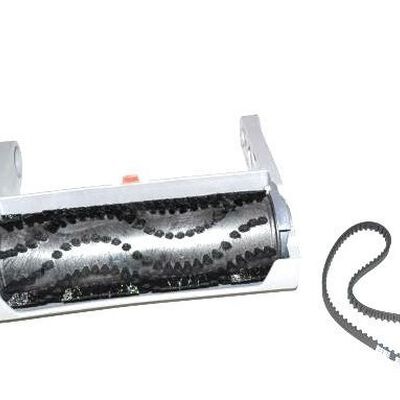
Brush Roll Not Spinning
The belt may be broken, worn out, or slipped off the pulley.
Symptoms: Vacuum runs, but the brush roll remains still, reducing cleaning effectiveness.
Solution: Unplug the vacuum, remove the brush roll cover, inspect the Bissell vacuum belt for damage or misalignment, and replace or reposition it as needed. Additionally, before reassembling, look for obstructions on the brush roll.
Brush Roll Making Grinding or Squeaking Noises
Worn or damaged brush roll bearings.
Symptoms: Loud grinding or squeaking sounds while the vacuum runs.
Solution: Check for damage or wear on the bearings. If the bearings are bad, replace the complete brush roll assembly to have the silent, smooth operation again.
Brush Roll Stops Frequently During Use
Motor overheating or safety shutoff triggered by blockages or excessive strain.
Symptoms: Brush roll stops intermittently or vacuum shuts off unexpectedly.
Solution: Verify and remove any obstructions in the filters, hose, or brush roll region. To avoid frequent shutdowns, let the motor cool fully before restarting.
Brush Roll Getting Stuck or Jammed
Large debris or foreign objects caught under or around the brush roll.
Symptoms: Brush roll stops suddenly or struggles to turn.
Solution: Unplug the vacuum and thoroughly check around the brush roll for any large debris or foreign objects causing the jam. Carefully remove all obstructions to allow the brush roll to spin freely again.
Brush Roll Bristles Wearing Out or Missing
Normal wear and tear from prolonged use.
Symptoms: Reduced agitation and cleaning performance, visibly worn or missing bristles.
Solution: If the bristles are worn down or missing, the brush roll will lose its ability to agitate dirt effectively. Replace the brush roll with a new one to ensure optimal cleaning performance.
By following these instructions, you can identify and resolve common brush roll issues, ensuring your Bissell vacuum always performs optimally.
Check out this guide on replacing carbon brushes in power tools to learn how to fix worn brushes and improve your vacuum’s motor performance.
Diagnosing Overheating Issues in Your Bissell Vacuum
Overheating can cause your Bissell vacuum to shut down unexpectedly and reduce its performance. Understanding how to diagnose these issues early helps prevent damage and keeps your vacuum running smoothly.
Clogged Filters and Dustbin
Dirty or blocked filters and a full dustbin restrict airflow, causing the motor to overheat.
Signs:
-
Vacuum feels hot to the touch
-
Burning smell during operation
-
Motor shuts off unexpectedly
Fixes:
-
Unplug and Remove Filters and Dustbin: To be safe, always unplug the vacuum before cleaning.
-
Clean or Replace Filters: Wash washable filters thoroughly or replace non-washable filters as per the manufacturer’s instructions.
-
Empty and Clean Dustbin: Regularly empty the dustbin and wipe it clean to prevent airflow blockage.
-
Reinstall Properly: Make sure the Bissell vacuum filters and the dustbin are securely placed back before operating the vacuum.
Brush Roll Blockages
Debris caught in the hose or brush roll area restricts airflow and strains the motor.
Signs:
-
Reduced suction power
-
Brush roll stops or spins unevenly
-
Vacuum overheats and shuts off
Fixes:
-
Turn Off and Unplug Vacuum: Always unplug before inspecting to avoid injury.
-
Inspect Hose and Brush Roll: Check the hose and brush roll area for debris, hair, or objects causing blockages.
-
Remove Tangled Debris: Use scissors or a brush to carefully remove any hair or strings wrapped around the brush roll.
-
Test Vacuum Operation: After clearing blockages, reassemble and run the vacuum to ensure smooth brush roll rotation and suction.
Worn or Damaged Brush Roll Components
Tangled, worn, or damaged brush roll parts create friction that overheats the motor.
Signs:
-
Grinding or squeaking noises
-
Brush roll vibrates or wobbles excessively
-
Reduced cleaning effectiveness
Fixes:
-
Carefully Remove Brush Roll: To properly remove the brush roll, refer to your vacuum's instruction manual.
-
Clean Brush Roll Thoroughly: Remove hair, threads, and debris from bristles and bearings to reduce friction.
-
Replace Worn or Damaged Parts: If the brush roll or bearings are worn out or broken, replace them with compatible parts.
-
Reassemble and Test: Secure the brush roll correctly and test the vacuum for normal operation and noise reduction.
Prolonged Continuous Operation
Running the vacuum without breaks causes the motor to build up heat and overheat.
Signs:
-
Vacuum heats up noticeably after extended use
-
Motor shuts off unexpectedly
-
Decreased suction over time
Fixes:
-
Use Vacuum in Shorter Sessions: Limit continuous use to recommended periods.
-
Allow Cooling Breaks: After using your vacuum for 15 to 20 minutes, let it cool down.
-
Follow Manufacturer’s Guidelines: Check the user manual for advised operating times and cooling intervals.
-
Monitor Vacuum Temperature: Stop using the vacuum if it feels excessively hot to prevent damage.
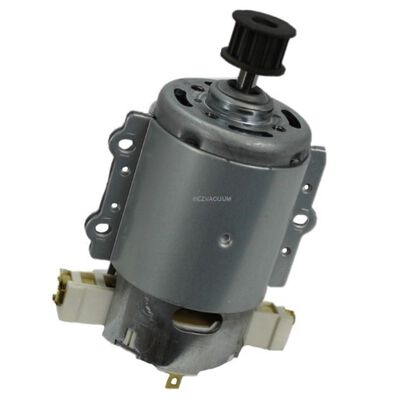
Motor or Electrical Faults
Internal motor problems, electrical faults, or Bissell vacuum battery issues can generate excess heat and cause your vacuum to malfunction.
Signs:
-
Burning smell or smoke from the vacuum
-
The vacuum won't start or stop working suddenly.
-
Strange sounds emanating from the engine area
Fixes:
-
Stop Using Immediately: Unplug the vacuum to avoid potential hazards.
-
Visually Inspect for Damage: Look for burnt wires, loose connections, or damaged components.
-
Contact Bissell Support or a Technician: Seek professional help for repairs. Do not attempt electrical repairs yourself.
-
Avoid DIY Electrical Fixes: For safety and warranty reasons, leave motor or electrical issues to trained professionals.
Checking Suction Loss, Electrical Problems, and Hose Blockages
Suction issues in your Bissell vacuum can make cleaning inefficient and frustrating. Diagnosing the root cause, whether it's suction loss, a blockage, or an electrical fault is key to restoring performance.
Suction Loss
Suction loss can happen gradually or suddenly and usually points to a maintenance or airflow issue. If your Bissell vacuum is not suctioning properly, check the dustbin and filters for blockages or fullness.
-
Check the Dustbin: If the dustbin is full, it can restrict airflow. Empty it regularly to maintain strong suction.
-
Inspect the Filters: Dirty or clogged filters block the air passage. According to the user manual, remove, clean, or replace the filters.
-
Seal Air Leaks: Ensure all components (hose, Bissell vacuum attachments, canister) are securely connected to avoid air leaks.
-
Examine the Intake Port: Remove any dirt buildup or lint that may be covering the suction inlet.
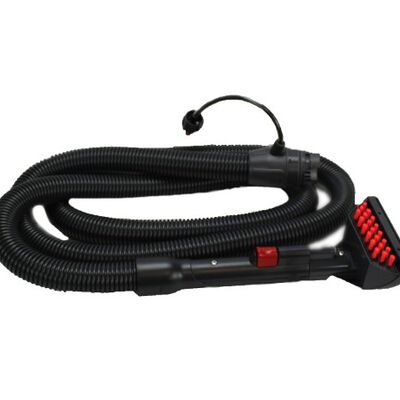
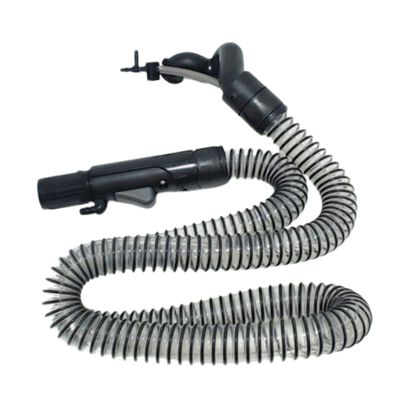
Hose Blockages
The vacuum hose is a common place for clogs to form, especially with hair, paper, or large debris.
-
Disconnect and Check the Hose: Remove the hose and look through it for visible clogs.
-
Use a Flexible Cleaning Tool: Gently push a broomstick or hose brush through to dislodge debris.
-
Inspect for Damage: Look for splits, holes, or worn areas that may cause air leaks.
-
Reconnect Securely: Reattach the hose tightly to all ports to maintain proper airflow.
Electrical Problems
Sometimes, the suction loss isn’t mechanical; it can be due to electrical faults affecting motor performance.
-
Check the Power Cord: Inspect for fraying, exposed wires, or loose plugs.
-
Try a Different Outlet: A faulty outlet may interrupt consistent power to the vacuum.
-
Monitor for Shut-Offs: If the vacuum powers off mid-use, it may be overheating or have a loose wire.
-
Consult a Technician: For internal wiring or motor issues, contact Bissell support or a certified repair center.
Cleaning and Maintaining Your Bissell Vacuum to Prevent Future Problems
Regular cleaning and maintenance are key to keeping your Bissell vacuum parts running smoothly. Avoid issues like suction loss, overheating, or worn parts with a few simple habits.
-
Empty the Dustbin Frequently: Clear the dustbin after every few uses to maintain strong airflow and suction. A full bin restricts airflow and puts extra strain on the motor.
-
Clean or Replace Filters: Depending on usage, wash reusable filters every one to three months. To guarantee adequate ventilation and effectiveness, swap out non-washable ones.
-
Inspect Hose and Attachments: Check hoses and tools for clogs using a brush or compressed air. Blockages can reduce suction and make cleaning less effective.
-
Clean the Brush Roll: Frequently clear the brush roll of any debris, matted hair, or string. Replace it if bristles appear uneven, soft, or damaged.
-
Check the Belt: Examine the Belt: Verify that the belt is not sliding, broken, or strained. A worn belt reduces brush roll performance and cleaning power.
-
Wipe Down the Vacuum: Use a soft cloth to wipe down vents and the vacuum’s exterior. This prevents dust buildup that can affect motor ventilation.
-
Store Properly: When not in use, keep your vacuum in a cool, dry place. Heat or moisture can damage internal parts over time.
By sticking to these maintenance habits, you’ll reduce breakdowns and enjoy powerful, consistent cleaning.
Check out our guide on top Bissell carpet cleaner parts that frequently fail & fixes to learn how to keep your vacuum running smoothly and avoid costly repairs.
Conclusion
Effectively diagnosing your faulty Bissell vacuum, including models like the Bissell cordless vacuum, is essential to maintaining performance and prolonging lifespan. By following a systematic troubleshooting approach, you can quickly identify common issues such as brush roll problems, suction loss, or overheating, and take the appropriate steps to fix them. In addition to saving you money on expert servicing, routine inspections, and prompt repairs guarantee your vacuum will continue to provide strong, effective cleaning. With the right knowledge and care, keeping your Bissell vacuum parts in top working condition becomes a simple, manageable task.
FAQs
What are the recalls on Bissell vacuums?
Bissell occasionally issues recalls for certain vacuum models due to safety or performance concerns. To check for recalls, visit the official Bissell website or the Consumer Product Safety Commission (CPSC) database for the latest updates.
Where is the reset button on the Bissell vacuum?
The reset button on most Bissell vacuums is located near the power cord or on the bottom of the unit. Pressing this button can help restore the vacuum after overheating or motor overload.
What is the lifespan of a Bissell vacuum?
On average, a Bissell vacuum lasts about 5 to 7 years with proper care and maintenance. Regular cleaning and timely replacement of parts can help extend its lifespan.
What causes a Bissell vacuum to stop working?
Common causes for a Bissell vacuum to stop working include clogged filters, blockages, electrical issues, or motor failure. Troubleshooting these problems can often restore functionality without needing professional repair.